Button
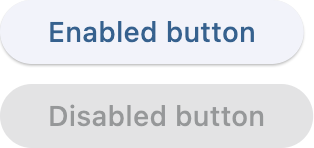
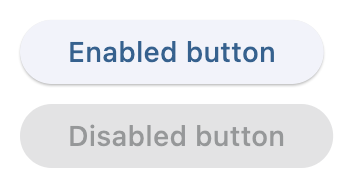
Enabled and disabled buttons
Inherits: LayoutControl, AdaptiveControl
Properties
-
autofocus(bool | None) –Whether this button should be focused initially.
-
bgcolor(ColorValue | None) –The button's background color.
-
clip_behavior(ClipBehavior | None) –The button's clip behavior.
-
color(ColorValue | None) –The button's foreground color.
-
content(StrOrControl | None) –The button's label.
-
elevation(Number) –The button's elevation.
-
icon(IconDataOrControl | None) –The icon to display inside the button.
-
icon_color(ColorValue | None) –The color of the icon.
-
style(ButtonStyle | None) –The button's style.
-
url(str | Url | None) –The URL to open when the button is clicked.
Events
-
on_blur(ControlEventHandler[Button] | None) –Called when the button loses focus.
-
on_click(ControlEventHandler[Button] | None) –Called when the button is clicked.
-
on_focus(ControlEventHandler[Button] | None) –Called when the button is focused.
-
on_hover(ControlEventHandler[Button] | None) –Called when the button is hovered.
-
on_long_press(ControlEventHandler[Button] | None) –Called when the button is long-pressed.
Methods
-
focus–Requests focus for this control.
Examples#
Button#
import flet as ft


def main(page: ft.Page):
    page.add(
        ft.SafeArea(
            content=ft.Column(
                controls=[
                    ft.Button(content="Enabled button"),
                    ft.Button(content="Disabled button", disabled=True),
                ]
            )
        ),
    )


if __name__ == "__main__":
    ft.run(main)
Icons#
import flet as ft


def main(page: ft.Page):
    page.add(
        ft.SafeArea(
            content=ft.Column(
                controls=[
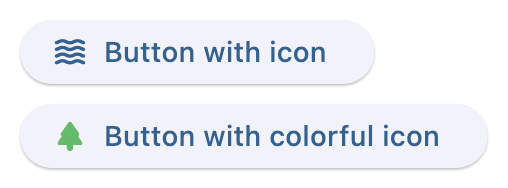
                    ft.Button(content="Button with icon", icon=ft.Icons.WAVES_ROUNDED),
                    ft.Button(
                        content="Button with colorful icon",
                        icon=ft.Icons.PARK_ROUNDED,
                        icon_color=ft.Colors.GREEN_400,
                    ),
                ]
            )
        ),
    )


if __name__ == "__main__":
    ft.run(main)
Handling clicks#
import flet as ft


def main(page: ft.Page):
    def button_clicked(e: ft.Event[ft.Button]):
        button.data += 1
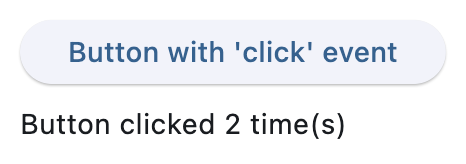
        message.value = f"Button clicked {button.data} time(s)"

    page.add(
        ft.SafeArea(
            content=ft.Column(
                controls=[
                    button := ft.Button(
                        content="Button with 'click' event",
                        data=0,
                        on_click=button_clicked,
                    ),
                    message := ft.Text(),
                ]
            )
        ),
    )


if __name__ == "__main__":
    ft.run(main)
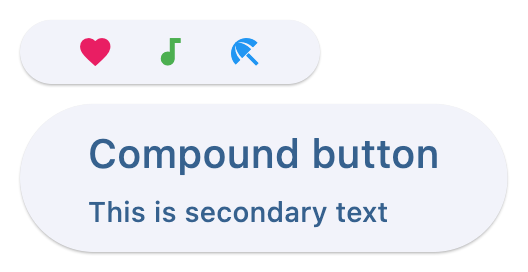
Custom content#
import flet as ft


def main(page: ft.Page):
    page.add(
        ft.SafeArea(
            content=ft.Column(
                controls=[
                    ft.Button(
                        width=150,
                        content=ft.Row(
                            alignment=ft.MainAxisAlignment.SPACE_AROUND,
                            controls=[
                                ft.Icon(ft.Icons.FAVORITE, color=ft.Colors.PINK),
                                ft.Icon(ft.Icons.AUDIOTRACK, color=ft.Colors.GREEN),
                                ft.Icon(ft.Icons.BEACH_ACCESS, color=ft.Colors.BLUE),
                            ],
                        ),
                    ),
                    ft.Button(
                        content=ft.Container(
                            padding=ft.Padding.all(10),
                            content=ft.Column(
                                alignment=ft.MainAxisAlignment.CENTER,
                                spacing=5,
                                controls=[
                                    ft.Text(value="Compound button", size=20),
                                    ft.Text(value="This is secondary text"),
                                ],
                            ),
                        ),
                    ),
                ]
            )
        ),
    )


if __name__ == "__main__":
    ft.run(main)
Shapes#
import flet as ft


def main(page: ft.Page):
    page.padding = 30
    page.spacing = 30

    page.add(
        ft.SafeArea(
            content=ft.Column(
                controls=[
                    ft.Button(
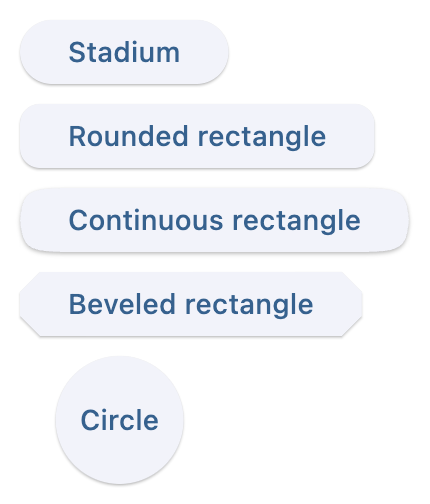
                        content="Stadium",
                        style=ft.ButtonStyle(shape=ft.StadiumBorder()),
                    ),
                    ft.Button(
                        content="Rounded rectangle",
                        style=ft.ButtonStyle(
                            shape=ft.RoundedRectangleBorder(radius=10)
                        ),
                    ),
                    ft.Button(
                        content="Continuous rectangle",
                        style=ft.ButtonStyle(
                            shape=ft.ContinuousRectangleBorder(radius=30)
                        ),
                    ),
                    ft.Button(
                        content="Beveled rectangle",
                        style=ft.ButtonStyle(
                            shape=ft.BeveledRectangleBorder(radius=10)
                        ),
                    ),
                    ft.Button(
                        content="Circle",
                        style=ft.ButtonStyle(shape=ft.CircleBorder(), padding=30),
                    ),
                ]
            )
        ),
    )


if __name__ == "__main__":
    ft.run(main)
Styling#
import flet as ft


def main(page: ft.Page):
    page.add(
        ft.SafeArea(
            content=ft.Column(
                controls=[
                    ft.Button(
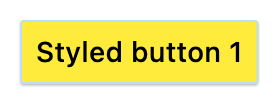
                        content="Styled button 1",
                        style=ft.ButtonStyle(
                            color={
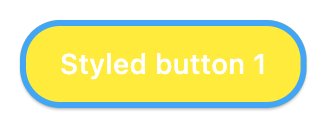
                                ft.ControlState.HOVERED: ft.Colors.WHITE,
                                ft.ControlState.FOCUSED: ft.Colors.BLUE,
                                ft.ControlState.DEFAULT: ft.Colors.BLACK,
                            },
                            bgcolor={
                                ft.ControlState.FOCUSED: ft.Colors.PINK_200,
                                ft.ControlState.DEFAULT: ft.Colors.YELLOW,
                            },
                            padding={ft.ControlState.HOVERED: 20},
                            overlay_color=ft.Colors.TRANSPARENT,
                            elevation={
                                ft.ControlState.DEFAULT: 0,
                                ft.ControlState.HOVERED: 5,
                                ft.ControlState.PRESSED: 10,
                            },
                            animation_duration=500,
                            side={
                                ft.ControlState.DEFAULT: ft.BorderSide(
                                    1, color=ft.Colors.BLUE_100
                                ),
                                ft.ControlState.HOVERED: ft.BorderSide(
                                    3, color=ft.Colors.BLUE_400
                                ),
                                ft.ControlState.PRESSED: ft.BorderSide(
                                    6, color=ft.Colors.BLUE_600
                                ),
                            },
                            shape={
                                ft.ControlState.HOVERED: ft.RoundedRectangleBorder(
                                    radius=20
                                ),
                                ft.ControlState.DEFAULT: ft.RoundedRectangleBorder(
                                    radius=2
                                ),
                            },
                        ),
                    )
                ]
            )
        )
    )


if __name__ == "__main__":
    ft.run(main)
Default state
Hovered state
Animate on hover#
import flet as ft


def main(page: ft.Page):
    def animate(e: ft.Event[ft.Button]):
        e.control.rotate = 0.1 if e.data else 0

    page.add(
        ft.SafeArea(
            content=ft.Column(
                controls=[
                    ft.Button(
                        content="Hover over me, I'm animated!",
                        rotate=0,
                        animate_rotation=100,
                        on_hover=animate,
                        on_click=lambda e: page.add(
                            ft.Text("Clicked! Try a long press!")
                        ),
                        on_long_press=lambda e: page.add(
                            ft.Text("I knew you could do it!")
                        ),
                    )
                ]
            )
        )
    )


if __name__ == "__main__":
    ft.run(main)

Normal button
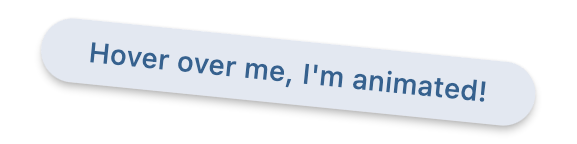
Hovered button
Properties#
class-attribute
instance-attribute
#
autofocus: bool | None = None
Whether this button should be focused initially.
class-attribute
instance-attribute
#
bgcolor: ColorValue | None = field(
    default=None, metadata={"skip": True}
)
The button's background color. If not specified, defaults to the theme's primary color.
class-attribute
instance-attribute
#
clip_behavior: ClipBehavior | None = None
The button's clip behavior.
class-attribute
instance-attribute
#
color: ColorValue | None = field(
    default=None, metadata={"skip": True}
)
The button's foreground color. If not specified, defaults to the theme's primary color.
class-attribute
instance-attribute
#
content: StrOrControl | None = None
The button's label.
Typically a Text control or a string.
If a string is provided, it will be wrapped in a Text control.
Raises:
-
ValueError–If neither
contentnoricon(string or visible control) is provided.
class-attribute
instance-attribute
#
The button's elevation.
If not specified, defaults to 1.
class-attribute
instance-attribute
#
icon: IconDataOrControl | None = None
The icon to display inside the button.
Typically an Icon control or an IconData.
If an IconData is provided, it will be wrapped in an Icon control.
Raises:
-
ValueError–If neither
iconnorcontent(string or visible control) is provided.
class-attribute
instance-attribute
#
icon_color: ColorValue | None = None
The color of the icon. If not specified, defaults to the current foreground color.
class-attribute
instance-attribute
#
style: ButtonStyle | None = field(
    default=None, metadata={"skip": True}
)
The button's style.
class-attribute
instance-attribute
#
The URL to open when the button is clicked.
Events#
class-attribute
instance-attribute
#
on_blur: ControlEventHandler[Button] | None = None
Called when the button loses focus.
class-attribute
instance-attribute
#
on_click: ControlEventHandler[Button] | None = None
Called when the button is clicked.
class-attribute
instance-attribute
#
on_focus: ControlEventHandler[Button] | None = None
Called when the button is focused.
class-attribute
instance-attribute
#
on_hover: ControlEventHandler[Button] | None = None
Called when the button is hovered.
class-attribute
instance-attribute
#
on_long_press: ControlEventHandler[Button] | None = None
Called when the button is long-pressed.